Plans & billing
HyoNova's Free, Basic, Business and Enterprise plans, what each includes, who can see and change billing, how you pay, and where limits appear.
On this page
Every HyoNova company has a plan. The plan decides how many people can join, how many office worlds you can run, how much you can store, how long meetings can last, how much Mail, Sign and Serene capacity is included, and which features your company can use. HyoNova checks these limits on the server wherever they apply. Billing is where you see the plan and its usage, choose and pay for a plan, buy extra capacity, and find every invoice issued to your company.
This page is about paying HyoNova for your plan. Invoicing your own customers is a different part of HyoNova with its own records: see Finance.
The plans#
HyoNova is priced per licensed seat — one seat for each internal member who holds a seat — not per minute of activity. Every new company starts with a 7-day Business trial without a card.
| Free | Basic | Business · Most popular | Enterprise | |
|---|---|---|---|---|
| Monthly billing | $0 | $6 per member / month | $15 per member / month | Custom pricing |
| Annual billing | — | $5.40 per member / month — $64.80 per member / year, save 10% | $12 per member / month — $144 per member / year, save 20% | Custom pricing |
| Licensed members | Up to 10 | Per seat | Per seat | 100+ seats, through HyoNova sales |
| Office worlds | 1 | 5 | 20 | Custom |
| Meetings | Up to 30 minutes per meeting | Included | Included | Included |
| Meeting recording | Not included | 2 recordings per paid seat per month, pooled | Included, fair use | Included |
| Storage | 5 GB in total | 10 GB per seat, pooled | 30 GB per seat, pooled | Custom |
| Mail credits (one time, promotional) | 500 | 5,000 | 10,000 | Custom |
| Sign envelopes (one time, promotional) | 2 | 10 | 25 | Custom |
| Serene credits | 250, one time | 500 per paid seat per month, pooled | 2,000 per paid seat per month, pooled | Custom |
- Basic is the complete virtual company workspace for small and growing teams. Business adds advanced analytics, automations, Support routing and deeper AI. The plan chooser in Company administration › Billing › Plan shows the full comparison from the same catalogue HyoNova bills from; a capability that is not built yet is shown as Coming soon, never as included.
- Enterprise is for companies with 100 or more seats, or that need SSO/SCIM, compliance terms, a custom SLA, high-volume capacity or dedicated onboarding. It is arranged with HyoNova sales — see Get help. Self-service checkout stops at the Enterprise threshold (100 seats by default).
- Prices are in US dollars. Other currencies are offered only where HyoNova publishes an explicit price in that currency; HyoNova never converts prices at an exchange rate.
- Annual billing is paid in advance for the year. Included monthly capacity — Serene credits and recording uses — still resets every month on an annual plan.
- Taxes. Where the payment provider is the merchant of record, it adds sales tax or VAT at checkout where it applies. Checkout shows the plan, seats, unit price, subtotal, discount, tax, total, billing interval and next renewal before you pay.
- Meeting recording is not available yet in HyoNova; the recording allowance applies once it is. See Recording and transcripts.
- Storage and other limits are set in HyoNova's catalogue and can be adjusted for a company by HyoNova.
More about seats, the trial and the Free plan in Seats, trial and the Free plan. Mail credits, Sign envelopes and capacity packs are explained in Mail and Sign capacity, and Serene credits in Serene credits.
What a plan sets#
| Part of the plan | What it controls | Where it applies |
|---|---|---|
| Seats | How many licensed members your company has. Pending invitations also use a seat. On Free, at most 10. | Inviting and adding members |
| Office worlds | How many office worlds your company can create | Creating an office during onboarding or when claiming a trial office |
| Storage | Space for files and office assets | Uploading company files, office content |
| Meeting length | How long one meeting can run (Free: 30 minutes) | Meetings |
| Included capacity | Mail credits, Sign envelopes and Serene credits | Sending email, sending signature requests, AI features |
| Guests | Whether guest links to office worlds and guests in meetings are included | Guest access in Settings and Company administration, guest links |
| Video and screen sharing | Whether members can turn on cameras and share screens in meetings | Calls and meetings |
| Custom branding | Whether your company may edit its branding | Company administration › Workspace › Branding |
Guests, meeting guests, people who sign through HyoNova Sign without being members, and customers who chat with your support team are not seats.
Who can see and change billing#
| Permission | Who has it by default | What it allows |
|---|---|---|
| Read billing | Owners and Admins | See the plan, seats, usage, capacity balances, invoices, payments and billing alerts |
| Manage billing | Owners | Choose and pay for a plan, change, cancel or resume the subscription, buy capacity packs, set the Serene budget, edit the billing profile, pay invoices, upload proof of a bank transfer |
Employees never see billing. Billing alerts in the workspace and the office (a trial ending, a failed payment, an overdue invoice, capacity running low or expiring) are shown only to people who can read billing, and billing emails go to people who can manage it. People who manage members also see what adding or removing a member will cost before they confirm.
Billing in Company administration#
Open Company administration in the sidebar and choose a page under Billing:
| Page | What you do there |
|---|---|
| Plan | See your plan and subscription status, compare plans, start a payment, change, cancel or resume the subscription. See Subscription and plan changes. |
| Seats | Licensed seats used, and the limit of your plan where it has one. See Seats, trial and the Free plan. |
| Usage | Office worlds and storage against your limits, Mail, Sign and Serene balances with their expiry dates, usage this month, and capacity packs to buy. See Mail and Sign capacity. |
| Invoices | Every invoice to your company, its status and amount due, and its document. See Invoices. |
| Payment | The payment method on file and the payments made. See Payment methods. |
The Overview page of Company administration also shows Seats and Seats available, and lists All seats are in use. under Needs attention when you run out.
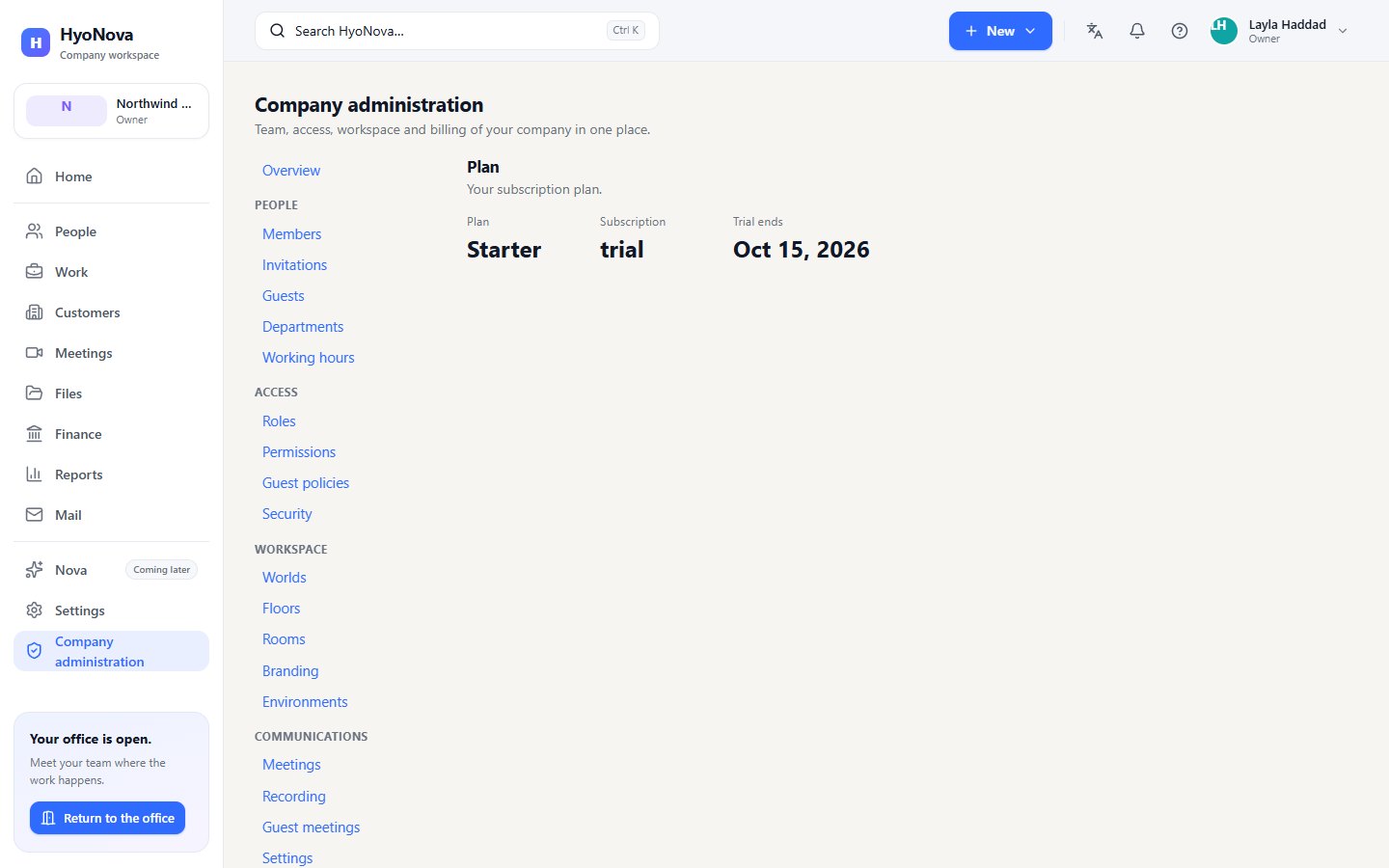
The Billing tab of Settings gives a short summary: the Plan card with Modules enabled, the Capabilities your plan switches on and the Product stage, and the Payment method card. See Company settings.
How you pay for HyoNova#
| Method | Handled by | Renewal |
|---|---|---|
| Card | FastSpring, HyoNova's reseller (merchant of record), which also handles sales tax where it applies | Automatic every period |
| PayPal | PayPal | Automatic every period |
| Crypto | Triple-A hosted payment page | A new HyoNova invoice each period, paid again |
| Bank transfer | HyoNova invoice with bank instructions, confirmed by HyoNova | A new HyoNova invoice each period |
- A subscription or a pack is activated only by a verified payment — the payment provider's signed confirmation, or HyoNova's confirmation of your bank transfer. Returning from a payment page is never enough on its own.
- Invoices and receipts. Where the payment provider is the merchant of record, its invoice and receipt are your documents; otherwise HyoNova issues the invoice. See Invoices.
- Refunds follow HyoNova's refund policy. A capacity pack can be refunded only for its unused share, and the matching credits are removed.
More in Payment methods and Pay by bank transfer.
Where limits show up#
HyoNova also tells you at the moment a limit matters:
- When you invite a member and all seats of your plan are used: Your company has used all of its seats. On Free, revoke a pending invitation or remove a member, or move to a paid plan.
- When you create an office during onboarding, the Your office world step shows Worlds used against your allowance. When none are left: Your plan has no more office worlds.
- When you upload a file and storage is full: Your company has reached a limit of its plan, such as file storage.
- In a meeting on Free, the meeting ends for everyone at 30 minutes, and joining it after that is refused with a message about your plan's meeting length.
- When Mail credits or Sign envelopes run out, campaigns pause, API emails are refused and new signature requests cannot be sent until you add capacity. See Mail and Sign capacity.
- In Settings, if guests are not part of your plan: Guest access is not included in your plan.
- In Branding, if it is not part of your plan: Custom branding is not included in your plan.
- In calls and meetings, if they are not part of your plan: Calls are not included in your company plan. Text chat keeps working.
Products included in your plan#
Hyo Mail#
Hyo Mail — email marketing and a transactional email API — is included in every plan. If your company does not have it, Mail shows Hyo Mail is not part of your plan.
Sending uses Mail credits: one credit for each email to one recipient. Your plan gives a one-time promotional amount, and you can buy packs — see Mail and Sign capacity. Emails HyoNova sends for the platform itself — sign-in, password reset, invitations, billing and receipts, signature requests and reminders, guest invitations and system notifications — never use Mail credits.
There is no monthly Mail allowance and no daily sending cap on any plan, and no plan limit on contacts. Credits are the only sending limit.
Every plan includes all Mail features: automations, A/B testing, advanced campaign analytics, the API and webhooks, and the AI designer. The AI designer uses Serene credits. The SMTP relay and a custom tracking domain are not available yet for any plan.
- See your usage in Mail › Settings › Usage, and your Mail credit balance in Company administration › Billing › Mail credits.
- When credits run out, a campaign does not pass the Enough Mail credits for every eligible recipient check, and a campaign that is already sending pauses with
MAIL_CREDITS_EXHAUSTED. See Mail and Sign capacity.
HyoNova Sign#
HyoNova Sign is included in every plan. Sending a signature request uses one Sign envelope; reminders, certificates and verification never do. See Mail and Sign capacity.
HyoNova Support#
Serene and AI Employees#
Serene credits are not a separate subscription: they come with your plan and can be extended with Boosts. AI Employees will be a separate recurring product; they are coming soon and cannot be bought yet.
Office & Event Visitors#
Office and Event Visitors — people from outside your company who enter your HyoNova office or one of your events — use prepaid Visitor Passes at $1 per admitted visitor. Office and Event Visitors are part of the Basic, Business and Enterprise plans; buy passes in Company administration › Visitors & Events › Visitor Passes.
- Packs of 10, 25, 50, 100, 250, 500 or 1,000 passes, valid 12 months, used oldest-expiry first.
- One pass per admitted visitor, used at admission. Re-entry during the visit, waiting, declined visitors and event no-shows cost nothing.
- Meeting-only guests need no Visitor Pass on any plan.
- No pass, no admission. HyoNova never admits visitors on credit and never bills visitors afterwards.
- Passes are separate from seats and appear in your invoices like any purchase. See Visitor Passes.
Status#
| Feature | Status | Notes |
|---|---|---|
| Plans and limits | AvailableWorks today for workspaces whose plan includes it. | Free, Basic, Business and Enterprise plans priced per licensed seat. Your plan sets seats, worlds, storage, meeting length, included capacity and features. |
| Seats, trial and the Free plan | BetaWorks today in early-access workspaces. Behaviour and limits may still change. | Billing per licensed seat, a 7-day Business trial without a card, the Free plan for up to 10 members, and seat changes billed predictably. |
| Mail and Sign capacity | BetaWorks today in early-access workspaces. Behaviour and limits may still change. | One-time promotional Mail credits and Sign envelopes per plan, a company wallet with expiry dates, and a full history of every grant and use. |
| Capacity packs | AvailableWorks today for workspaces whose plan includes it. | Buy Mail credit packs, Sign envelope packs and Serene Boosts, valid for 12 months. Capacity is added when the payment is verified. Pay with the payment methods shown at checkout (card, PayPal, bank transfer…). |
| Serene credits and AI budget | BetaWorks today in early-access workspaces. Behaviour and limits may still change. | One pooled Serene credit balance for every AI feature: monthly included credits on paid plans, Boosts, warnings and an owner budget cap. Serene credits are used by the Serene assistant (questions, Ask Serene, voice, chats with AI Employees) and the Mail AI designer, which work once HyoNova connects an AI provider. AI Employees are paid separately. |
| Online billing and payment | Requires setupBuilt, but works only after a supporting service is configured for your workspace. | Choose a plan, pay by card, PayPal, crypto or bank transfer, and change, cancel or resume your subscription inside HyoNova. A payment method appears only after HyoNova has set up its payment provider. |
| Pay by bank transfer | Requires setupBuilt, but works only after a supporting service is configured for your workspace. | Pay a HyoNova invoice by bank transfer with a unique payment reference, in full or in parts, and upload proof of payment. HyoNova confirms each transfer when it arrives; it is not instant. |
| HyoNova invoices and documents | BetaWorks today in early-access workspaces. Behaviour and limits may still change. | Every invoice HyoNova or its payment provider issues to your company, with a printable English or Arabic document. |
| Billing profile | BetaWorks today in early-access workspaces. Behaviour and limits may still change. | The name, email, legal name, address and tax IDs printed on your HyoNova invoices. |
| Hyo Mail | AvailableWorks today for workspaces whose plan includes it. | Email marketing and transactional email: contacts, lists, segments, a drag-and-drop builder, campaigns, automation, forms and analytics. Each company verifies its own sending domain before sending. Sending uses Mail credits. SMTP relay and a custom tracking domain are not available yet. |
| HyoNova Support inbox | BetaWorks today in early-access workspaces. Behaviour and limits may still change. | One live inbox for every customer conversation, with views, filters, take, assign and transfer, replies with quick replies, article cards and link buttons, internal notes and canned replies. Website chat and tickets work without any outside service. Other channels need setup. |
| Visitor Passes | BetaWorks today in early-access workspaces. Behaviour and limits may still change. | Prepaid passes at $1 per admitted Office or Event Visitor, in packs of 10 to 1,000, valid 12 months; meeting guests stay free. |
Was this page helpful?
Thanks. Page ratings are not collected yet, so nothing was sent. If something is missing or wrong, see the Get help page.