Audit log
Owners and admins see who changed what in the company in Company administration › Company › Audit log, an append-only, read-only record.
On this page
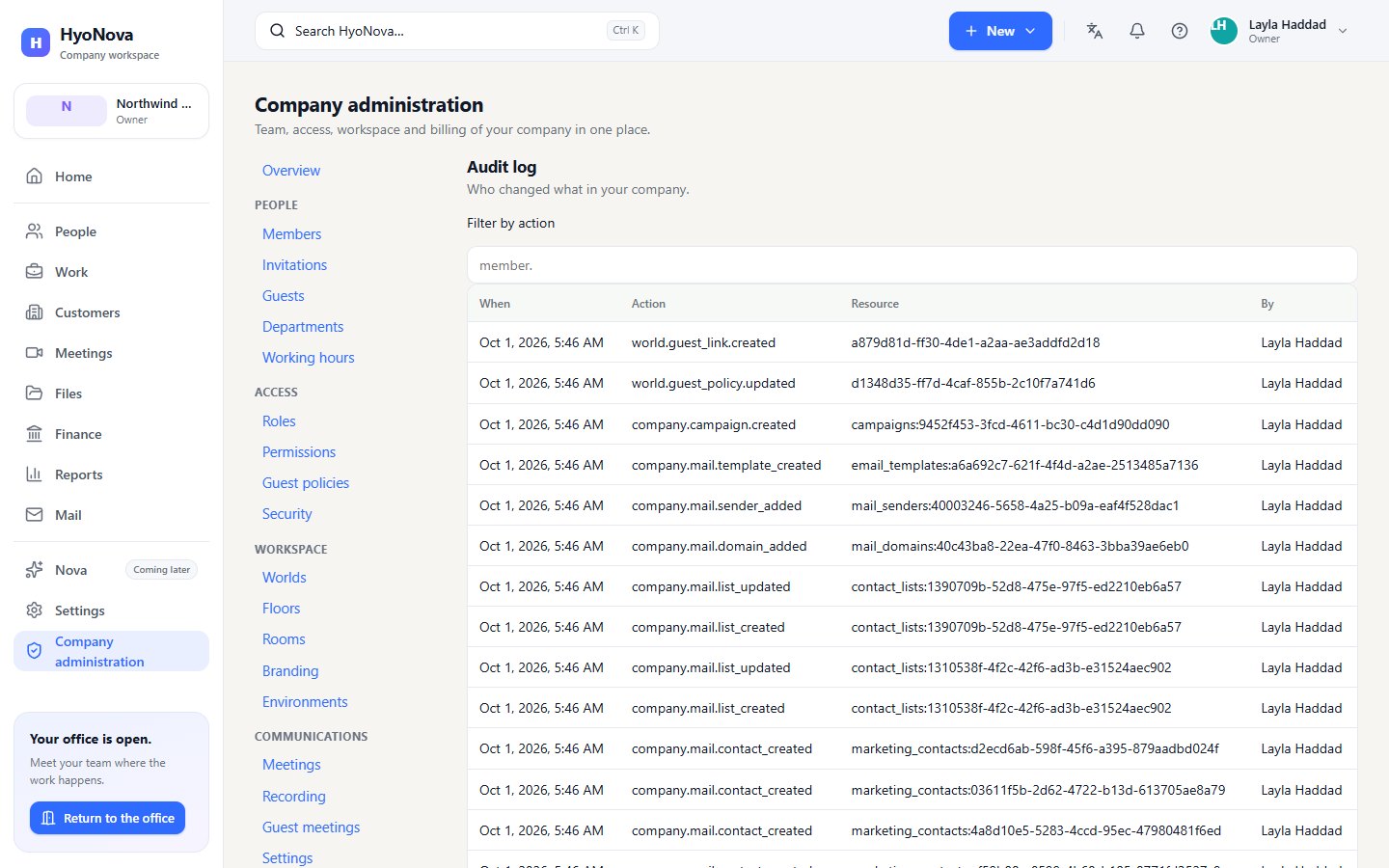
HyoNova keeps an audit log of important administrative changes in your company: invitations, role changes, custom roles, guest decisions, addresses and domains, the company profile and more. Owners and admins can read it in Company administration. Every entry records when a change happened, what the action was, which record it touched and who made it.
Who can see the audit log#
Owners and admins. Managers, employees and restricted members do not see the Audit log page. Members with a custom role see it only if their role includes permission to read the audit log.
Open the audit log#
- Open Company administration. In the company workspace sidebar, select Company administration.
- Go to Company › Audit log. In the sub-navigation, under Company, choose Audit log. The page lead reads Who changed what in your company.
Read the log#
The newest changes come first, 25 at a time. Select Load more to see older entries. When nothing has been recorded yet, the page shows No audit events yet.
| Column | What it shows |
|---|---|
| When | The date and time of the change |
| Action | The technical name of the action, for example a role change or a revoked guest link (see the examples below) |
| Resource | The record that changed, such as a member, a role, a domain or a guest link |
| By | The member who made the change, or "—" when there is no name to show |
Filter by action#
Type the start of an action name in Filter by action. The list then shows only actions that begin with what you typed. For example:
member.— invitations, role changes and removals.role.— custom roles created, edited or deleted.world.guest— guest links, guest policy and guest visit decisions.domain.— custom domains added, verified or removed.
Clear the field to see every action again. There is no date filter.
How the audit log works#
- Recorded on the server. Entries are written by HyoNova's servers together with the change itself, not by your browser.
- Append-only and read-only. Entries cannot be edited or deleted after they are written — not by your company and not on this page.
- Secrets removed. Passwords, tokens, secrets, cookies and anti-forgery tokens are never stored in the log.
- More than the screen shows. Each entry also keeps the relevant before and after values, a reason where one is given, and the request reference that the product shows with errors. These details are not shown on the page; if you need them for a past change, contact HyoNova through Get help.
- Platform changes too. Changes the HyoNova platform team makes to your company — for example to your plan — are recorded in the same log.
What gets recorded#
| Area | Recorded actions |
|---|---|
| Members | Creating an invitation, resending an invitation email, copying an invitation link, creating a new invitation link, revoking an invitation, accepting an invitation, changing a member's role, removing a member |
| Roles | Creating, editing and deleting a custom role |
| Company | Creating a company by sign-up, claiming a trial office as a company, changing the company profile, working hours or branding |
| Addresses and domains | Changing the company address or an office address, changing the default office, adding, verifying and removing a custom domain |
| Guests | Allowing or stopping guest access, creating and revoking guest links, approving, declining and ending guest visits, promoting a guest to employee |
| Office worlds | Creating an office world |
| Company data | Exporting company records |
| Account | Signing out |
Show technical details
- The audit entry for a change is written in the same database transaction as the change itself, and the database rejects any update or deletion of an audit entry.
- Viewing the log needs the
audit.readpermission, which the Owner and Admin roles hold. - Examples of action names you will see in the Action column:
- Members:
member.invite,member.invitation_regenerated,member.invitation_revoked,member.invitation_email_retried,member.invitation_link_copied,member.invitation_accepted,member.role_changed,member.removed - Roles:
role.created,role.updated,role.deleted - Company:
company.profile_updated,company.working_hours_updated,company.branding_updated - Addresses and domains:
organization.slug_changed,world.slug_changed,organization.default_world_changed,domain.added,domain.verified,domain.removed - Guests:
world.guest_link.created,world.guest_link.revoked,world.guest_policy.updated,world.guest_visit.approved,world.guest_visit.denied,world.guest_visit.ended,guest.promoted,guest.promotion.completed
- Members:
- Action names are not a public interface and may change.
Limits#
- No export of the audit log.
- No date filter; filter by the start of an action name and use Load more to go back in time.
- The page shows the four columns above; before and after values are not shown.
Status#
| Feature | Status | Notes |
|---|---|---|
| Company audit log | AvailableWorks today for workspaces whose plan includes it. | A read-only log of important changes in your company, filterable by action, for owners and admins. |
Was this page helpful?
Thanks. Page ratings are not collected yet, so nothing was sent. If something is missing or wrong, see the Get help page.