Spatial workplace
The HyoNova office is a shared 3D space in your browser where your team works, meets and talks every day. What you see there and what you need.
On this page
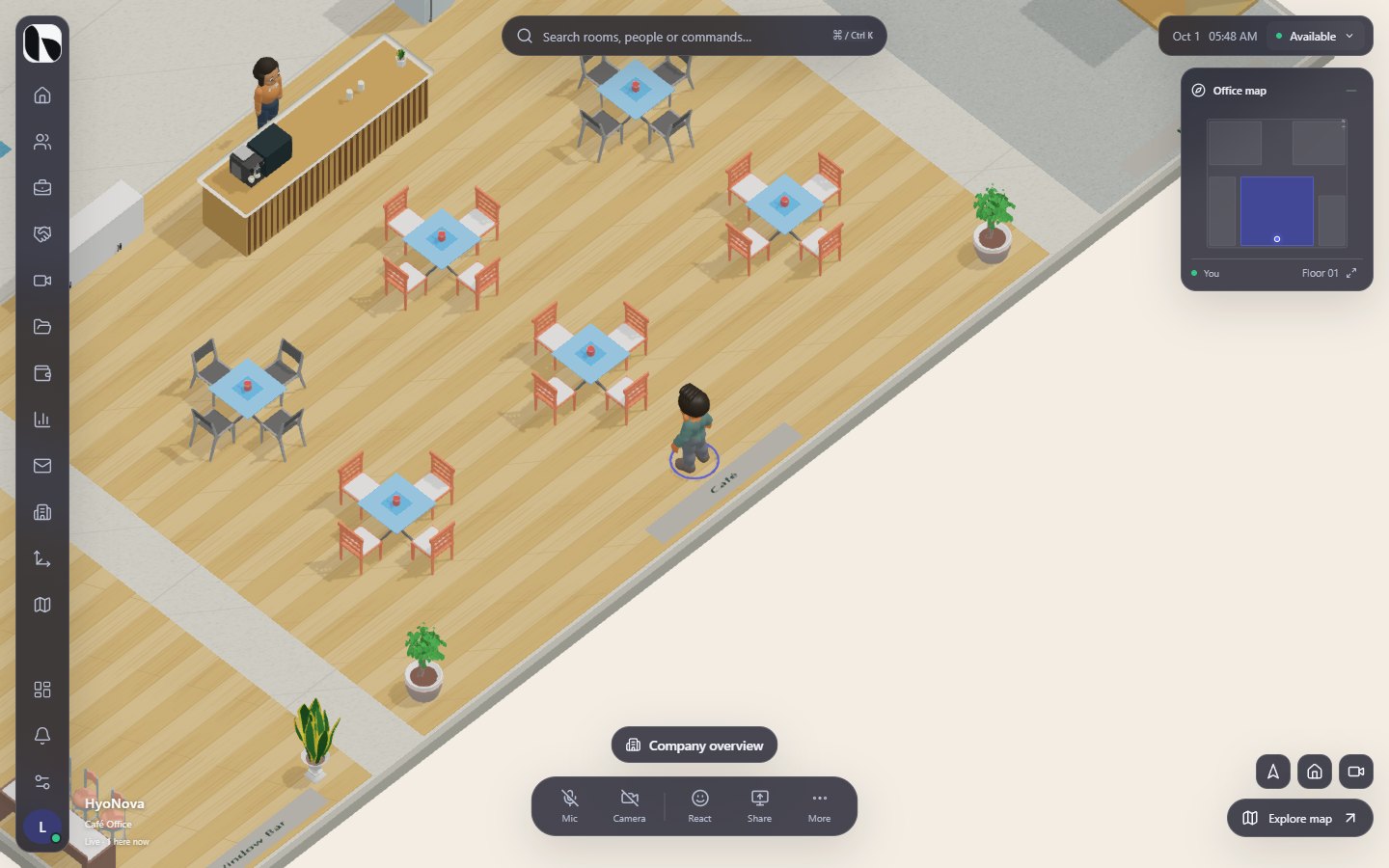
The spatial workplace is your company's office in HyoNova: a shared 3D space in the browser where every member appears as a character. You see who is in, walk over to a colleague, talk with the people around you, meet in a room and open your work — the way you would in a real office.
The office and the dashboard#
HyoNova gives every company two surfaces that show the same people and the same data:
| Surface | Use it for |
|---|---|
| The office (world) | The main surface for daily work: presence, quick conversations, meetings in rooms and fast access to your tasks. |
| The company workspace (dashboard) | Deep work and administration: planning projects, managing people and roles, reviewing customers, finance and reports. |
You do not have to switch tools to move between them. Inside the office, the rail on the left opens company areas such as People, Work and Meetings in a sheet beside the 3D view. The Company workspace button opens the full dashboard, and Return to the office brings you back. See Work in the world.
What you see in the office#
- Your character and your colleagues. Each person has a nameplate with their name and status. Guests carry a Guest tag, and the built-in characters of a template are marked Host. See Presence.
- Rooms. Meeting rooms, focus rooms, lounges and a reception area, each with a name and a capacity. See Rooms.
- Things you can use. Chairs to sit on, doors to open and screens to view. See Seats, doors and screens.
- The interface around the scene. A rail on the left, a search bar and your status at the top, the device controls at the bottom and a minimap. See The world interface.
At the bottom of the screen, the office caption shows the office name and how you are connected: Live for your company office, Guest visit for visitors and Demo for the instant trial. In a live office it also shows how many people are here now.
What you can do today#
- Choose an office from twelve templates, or start from an empty floor. See Worlds and spaces.
- Walk, run, sit and switch between three camera views. See Navigation.
- Find people, rooms and commands with Ctrl + K, and see the whole office on the map. See Map and search.
- Talk to the people near you with spatial voice, after you choose to turn it on. See Proximity and voice.
- Start or join a meeting in a meeting room with Meet here.
- Open Your work when you sit at a desk, and Company overview in the lobby.
- Change your look in My character. See Your character.
- Owners and admins can arrange the office in the office builder, which is in Preview and saves changes in the browser only.
| Feature | Status | Notes |
|---|---|---|
| Office worlds and templates | AvailableWorks today for workspaces whose plan includes it. | Twelve ready-made 3D offices, from a small café office to a company campus, or an empty floor. |
| Movement and camera views | AvailableWorks today for workspaces whose plan includes it. | Walk with the keyboard or double-click to move, run, sit, and switch between three views. |
| Search and company chat | AvailableWorks today for workspaces whose plan includes it. | Find people, rooms and commands with Ctrl/⌘ K and walk there; open the company chat from the office. |
| Presence and status | AvailableWorks today for workspaces whose plan includes it. | Available, Away and Do not disturb, with nameplates that show who is around you. |
| Spatial voice | BetaWorks today in early-access workspaces. Behaviour and limits may still change. | Talk to people near you, the way you would in a real office. Opt-in, with clear distance rules. |
| Rooms and meeting rooms | AvailableWorks today for workspaces whose plan includes it. | Rooms with a type and capacity. Meeting rooms offer “Meet here” to start a meeting in place. |
| Seats, doors and screens | AvailableWorks today for workspaces whose plan includes it. | Sit on chairs, open doors and view screens. In a meeting, shared screens appear on room displays. |
| Personal scratchpad | AvailableWorks today for workspaces whose plan includes it. | A quick sketch pad saved only on your device. |
| Reactions | PreviewA first, limited version you can use today. Important parts are still missing. | Quick emoji reactions above your character. Reactions currently appear only on your own screen. |
| Company workspace inside the world | AvailableWorks today for workspaces whose plan includes it. | Quick Work and task sheets beside the 3D office, Your work at your desk, and the full company workspace one click away. |
Who can enter#
Every member of your company can enter the office. What each person can do inside depends on their role — for example, only owners and admins can open the office builder, and restricted members do not see chat. Visitors without an account can enter one office with a guest link when your company allows guests. See World permissions and Guests.
What you need#
- A current desktop browser with WebGL enabled. If WebGL is off, HyoNova shows We couldn’t open this workplace with the reason instead of the office.
- A screen wider than 600 pixels. On narrower screens, such as phones, HyoNova shows the message Your office, on a bigger canvas. instead of the office. Tablets work.
- A microphone only if you want to talk, and a camera only for calls and meetings. You can enter and move around without either.
- For voice, calls and meetings, your company needs the media service HyoNova provides to be available for your workspace. Text chat works without it.
Coming next#
The 3D office needs a larger screen today. A phone experience for chat, meetings and presence is planned, together with other office capabilities:
| Feature | Status | Notes |
|---|---|---|
| Mobile companion | PlannedOn the HyoNova roadmap. Not built yet and has no release date. | A phone experience for chat, meetings and presence. Today the 3D office needs a screen wider than 600 pixels. |
| Multiple floors | PlannedOn the HyoNova roadmap. Not built yet and has no release date. | Offices with more than one floor, connected by stairs or lifts. |
| Private rooms and knock to enter | PlannedOn the HyoNova roadmap. Not built yet and has no release date. | Room access rules you can set in the office, with a knock button for restricted rooms. |
| Project rooms | AvailableWorks today for workspaces whose plan includes it. | Link a project to a room in your office so its work is one walk away. |
| Shared whiteboards | PlannedOn the HyoNova roadmap. Not built yet and has no release date. | Whiteboards everyone in a room can draw on together. |
| Desk assignment | PlannedOn the HyoNova roadmap. Not built yet and has no release date. | Assigned, shared and bookable desks managed from the office. |
| Desktop apps | PlannedOn the HyoNova roadmap. Not built yet and has no release date. | Installable HyoNova apps for Windows and macOS. Today HyoNova runs in the browser. |
None of these are available yet. See Coming to HyoNova for the full list.
Explore the spatial workplace#
Worlds and spaces
What an office world is in HyoNova, the twelve templates you can start from, how rooms and floors are organised, and how office addresses work.
Moving around the office
Walk, run, double-click to move, sit, switch between three camera views and get to rooms quickly in the HyoNova office.
The world interface
The rail, top bar, bottom controls, prompts, notifications, reactions and settings around the 3D office, and how to adjust them.
Map and search
Use the minimap, the full office map and search (Ctrl/⌘ K) to find people, rooms, other offices and commands in HyoNova.
Was this page helpful?
Thanks. Page ratings are not collected yet, so nothing was sent. If something is missing or wrong, see the Get help page.