Profile & character
Choose how you appear in the office — a ready-made look, then hair, clothes, colours, skin tone and height — and set your display name.
On this page
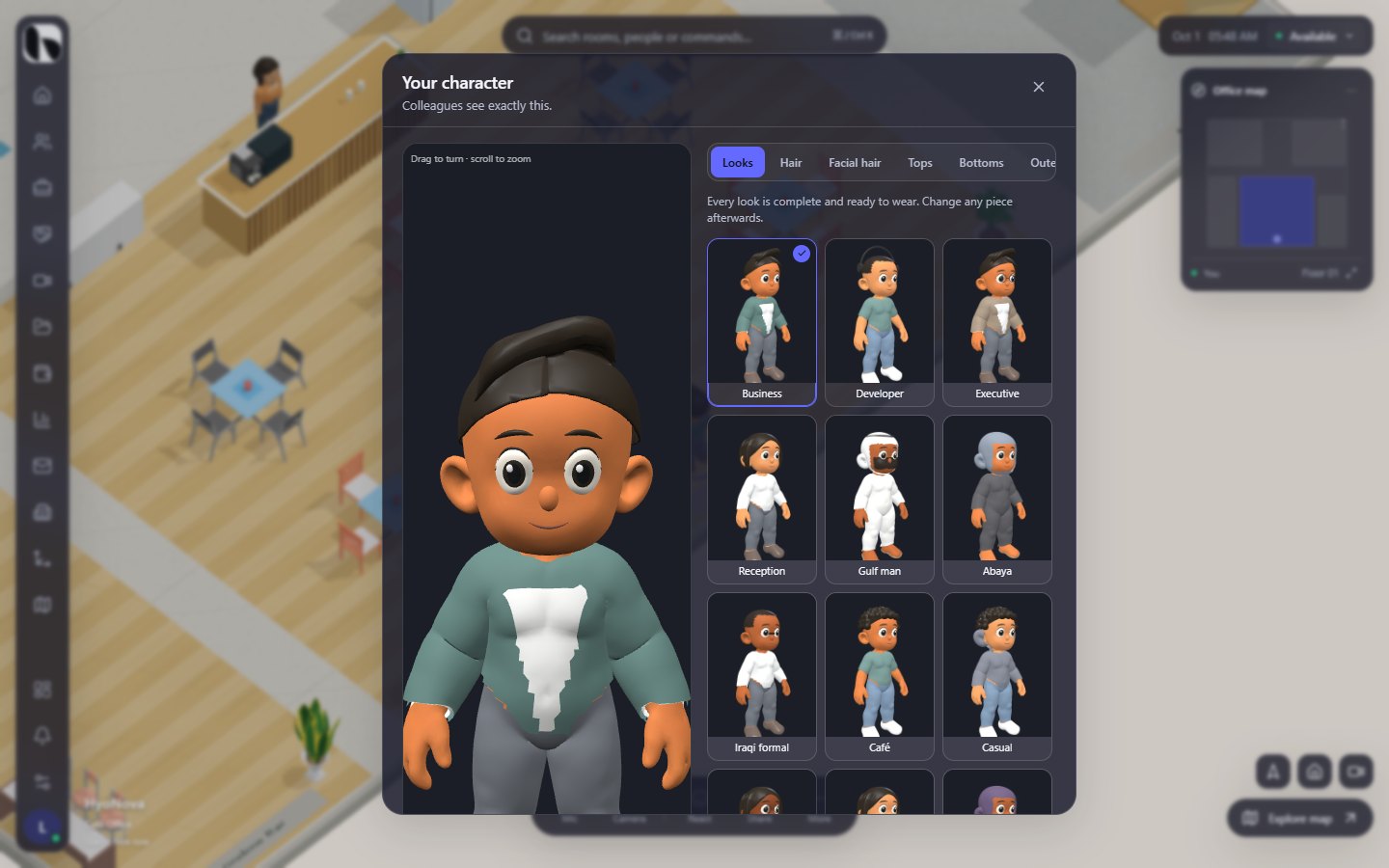
In the office, you appear as a 3D character. You start from a complete, ready-made look and can then change any piece: hair, facial hair, clothes, shoes, headwear, accessories, colours, skin tone and height. The sheet is titled Your character — Colleagues see exactly this.
Where to change your character#
| Where | What you can change |
|---|---|
| My character — the button with your initial at the bottom of the left rail in the office | Everything on this page |
| Search: press Ctrl + K and choose Change my character | Opens the same sheet |
| Onboarding, step Your character | Choose one of ten starting looks |
| Company workspace › Settings › Profile | Display name, Language, and a starting look under Your character |
| Trial office: Change character on the side card | Opens the same sheet |
Guests choose a starting look on the entry screen before they enter; see Guest links.
Choose a starting look#
Open Looks. Every look is complete and ready to wear. Change any piece afterwards.
| Starting looks |
|---|
| Business, Business woman, Developer, Creative, Executive, Casual, Startup, Gulf man, Gulf woman, Iraqi formal, Reception, Modern, Café, Abaya |
The character sheet offers all fourteen looks. Onboarding, the guest entry screen and Settings › Profile offer ten of them: Business, Developer, Executive, Reception, Gulf man, Abaya, Iraqi formal, Café, Casual and Creative.
The wardrobe#
The tabs across the sheet are Looks, Hair, Facial hair, Tops, Bottoms, Outerwear, Shoes, Headwear, Accessories and Body. Each item is shown as a thumbnail of the real character.
| Tab | Items |
|---|---|
| Hair | Sweep, Curls, Bob, Short, None |
| Facial hair | Short beard, Stubble, Mustache, None |
| Tops | Shirt, T-shirt, Hoodie, Thobe, Abaya |
| Bottoms | Trousers, Jeans |
| Outerwear | Blazer, Jacket, None |
| Shoes | Sneakers, Formal shoes, Sandals |
| Headwear | Ghutra and agal, Hijab, None |
| Accessories | Glasses, Headphones, None |
A few pieces work together:
- Thobe and Abaya are full-length, so bottoms and outerwear are hidden while you wear them.
- Ghutra and agal and Hijab cover the hair.
- Tops, bottoms and shoes are always worn, so these tabs have no None option.
Colours#
- Hair colour: eight swatches plus a colour picker for any colour.
- Colour: when the selected piece can be recoloured, a Colour section with twelve swatches and a colour picker appears under the items. All clothes, shoes and accessories can be recoloured except Ghutra and agal.
Body#
In Body, choose a Skin tone — Light, Medium, Tan or Deep — and set your Height with the slider, from 160 to 190 cm.
Preview#
The large preview on the left shows your character as you change it. Drag to turn it and scroll to zoom. Under Preview animation, switch between Standing, Walking, Sitting and Wave, and select 360° to let it turn slowly.
Save your character#
- Make your changes. Use the tabs; the preview updates as you go. Reset to look returns every piece to the starting look you chose.
- Select Save appearance. HyoNova saves the character and closes the sheet.
- Members: your character is saved to your account and follows you to every office of your company. If you are in the live office when you save, HyoNova quietly reconnects you so colleagues see the new look.
- Trial office: the character is kept with your trial. When you claim the workspace, it comes with you to your new account.
- Settings › Profile saves your display name and starting look with Save. To adjust individual pieces, use My character in the office.
Profile settings#
In the company workspace, Settings › Profile holds:
- Language — English or العربية. Arabic switches the interface to right-to-left.
- Display name — the name colleagues see on your nameplate and in People (2 to 100 characters).
- Your character — your starting look.
Status#
| Feature | Status | Notes |
|---|---|---|
| Quick character looks | AvailableWorks today for workspaces whose plan includes it. | Start from a ready-made look, from business to Gulf and Iraqi formal wear. |
| Wardrobe and appearance | AvailableWorks today for workspaces whose plan includes it. | Hair, facial hair, tops, bottoms, outerwear, shoes, headwear, accessories, skin tone and height. |
Was this page helpful?
Thanks. Page ratings are not collected yet, so nothing was sent. If something is missing or wrong, see the Get help page.