Company administration
The Company administration area — people, access, workspace, communications, integrations, company profile, audit log and billing in one place.
On this page
Company administration is where owners, admins and managers look after the company as a whole: the team, roles and permissions, office worlds, meeting policy, integrations, the company profile, the audit log and billing. It opens from the company workspace sidebar and brings together, in eight sections, what used to be spread across several pages.
Who administers a company#
- Owners can do everything, including payroll and restricted finance records.
- Admins run the company day to day — members, invitations, roles, guests, office worlds, company profile, audit log and billing — but cannot see payroll or restricted finance records or change billing.
- Managers see Company administration with an overview and read-only pages. They manage guests (approve requests, end visits) and create guest links, but cannot invite members, manage roles, or open the audit log or billing.
- Employees and Restricted members never see Company administration. If they open its address, HyoNova sends them back to Home.
HyoNova checks every permission on the server, so hiding a button is never the only protection. See Roles and permissions.
Open Company administration#
- Open the company workspace. Sign in at https://app.hyonova.com and open your company. From the office, select Company workspace in the left rail.
- Select Company administration. It is the last item in the sidebar, below Settings.
- Choose a page. The sub-navigation on the left lists only the pages your role may open. A page you cannot use shows Not available for your role.
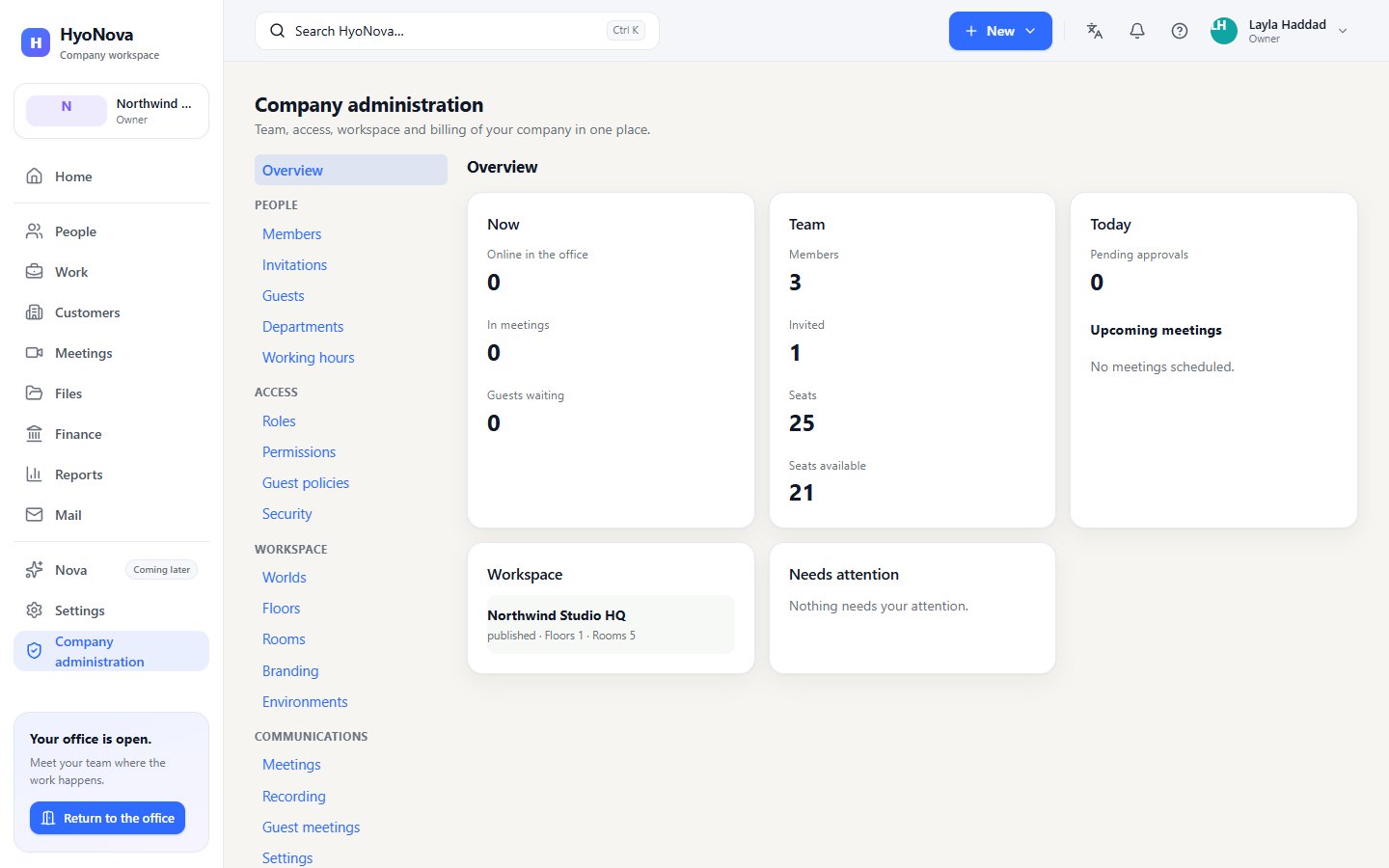
The page title is Company administration, with the lead Team, access, workspace and billing of your company in one place.
Overview#
The Overview page is the daily starting point. It shows real figures only:
| Card | What it shows |
|---|---|
| Now | Online in the office, In meetings and Guests waiting. If HyoNova cannot count who is online, the figure is "—" with Presence is not available from this server. |
| Team | Members, Invited, Seats and Seats available (or Unlimited) |
| Today | Pending approvals and your own Upcoming meetings (or No meetings scheduled.) |
| Workspace | Each office world with its status and the number of floors and rooms |
| Needs attention | Items that need action, each with an Open button — or Nothing needs your attention. |
Needs attention lists only real signals:
- Invitation emails could not be delivered.
- Email sending is not enabled; share invitation links directly.
- Meetings and calls are not enabled on this server.
- Guests are waiting to be admitted.
- A custom domain is not verified yet.
- All seats are in use.
The eight sections#
People#
- Members — everyone in the company with their role and status. Owners and admins change roles here, including custom roles, and remove members. You cannot change your own role.
- Invitations — invite a member and follow pending invitations and their emails, with Copy invitation link, Resend email, New link and Revoke. See Invitations.
- Guests — every guest visit by link: approve or decline waiting visitors, end visits, promote a guest to employee. See Guests.
- Departments — add and archive company departments. Renaming is not available yet, and members cannot be placed in a department yet.
- Working hours — the company's default working week and time zone. Saved for the company; no other feature uses it yet.
Access#
- Roles — the standard roles and your company's custom roles; create, edit and delete custom roles.
- Permissions — the permission matrix: what each role may do, editable for custom roles. See Roles and permissions.
- Guest policies — whether guests without an account may visit your office worlds (Allow guests / Stop allowing guests).
- Security — the sign-in rules that apply to every member, read-only. See Security.
Workspace#
- Worlds, Floors and Rooms — your office worlds and, from each published layout, their buildings, floors, rooms and zones.
- Branding — display name, logo address and accent colour for the company. They are saved, but not yet applied anywhere in the interface. Editing needs custom branding in your plan.
- Environments — the templates available for new office worlds, with Worlds used.
Communications#
- Meetings — the company's meetings.
- Recording — whether recording is available and the recording and transcription policy.
- Guest meetings — whether outside guests may join meetings (Allow external guests), and what they may do.
- Settings — meeting defaults such as video, screen sharing, maximum participants, retention and encryption.
See Meetings for how these settings affect a meeting.
Integrations#
- Integrations — the real state of connections to outside tools. See Integrations.
Company#
- Profile — company name, language, country and time zone, with the company's status and creation date.
- Domains and Addresses — the company address, office addresses and custom domains. See Company settings.
- Audit log — who changed what in your company. See Audit log.
Billing#
- Plan, Seats, Usage, Invoices and Payment — your plan and its limits, read-only. See Plans & billing.
Who sees which page#
With the standard roles:
| Section | Page | Owner | Admin | Manager |
|---|---|---|---|---|
| Overview | Overview | Yes | Yes | Yes |
| People | Members | Yes | Yes | Read only, no role changes |
| People | Invitations | Yes | Yes | No |
| People | Guests | Yes | Yes | Yes |
| People | Departments | Add and archive | Add and archive | Read only |
| People | Working hours | Edit | Edit | Read only |
| Access | Roles, Permissions | Yes | Yes | No |
| Access | Guest policies | Switch on or off | Switch on or off | View |
| Access | Security | Yes | Yes | Yes |
| Workspace | Worlds, Floors, Rooms | Yes | Yes | Yes |
| Workspace | Branding | Edit | Edit | Read only |
| Workspace | Environments | Yes | Yes | No |
| Communications | Meetings | Yes | Yes | Yes |
| Communications | Recording, Guest meetings, Settings | Yes | Yes | No |
| Integrations | Integrations | Yes | Yes | Yes |
| Company | Profile | Edit | Edit | Read only |
| Company | Domains, Addresses, Audit log | Yes | Yes | No |
| Billing | Plan, Seats, Usage, Invoices, Payment | Read only | Read only | No |
Members with a custom role see exactly the pages their permissions allow. Pages that only show information say Read-only where a form would otherwise be.
Company administration, Settings and People#
- Settings in the sidebar has personal tabs for every member (Personal, Access) and workspace tabs for people who manage the company (Workspace, Connections, Billing). Some panels appear in both places — for example Address & domains, the guest switch and the guest visits list. See Company settings.
- People in the sidebar is the everyday directory. Owners and admins invite members there, change a member to another standard role and remove members. Custom roles are given only in Company administration › People › Members. See People.
- Company-wide settings — departments, working hours, roles, permissions, meeting policy, the company profile, the audit log and billing — live only in Company administration.
How the pieces connect#
- Seats and invitations. Every member and every pending invitation uses a seat on your plan. When all seats are used, new invitations are refused with Your company has used all of its seats., and Needs attention shows All seats are in use.
- Worlds and the builder. Office worlds are created during onboarding within your plan's world allowance. The office builder is in Preview: it saves in your own browser, and colleagues do not see your changes yet.
- Guests and plan. Guest access needs a plan that includes guests. It is included during early access.
- Voice, calls and meetings run on a media service HyoNova provides. If it is not available, Needs attention says so and text chat keeps working.
- Changes are recorded. Role changes, invitations, guest decisions, profile and domain changes appear in the audit log.
Status of administration features#
| Feature | Status | Notes |
|---|---|---|
| Company settings | AvailableWorks today for workspaces whose plan includes it. | Your profile and language, guest access for office worlds, and your workspace address. |
| Company and office addresses | AvailableWorks today for workspaces whose plan includes it. | A short, readable address for your company and each office. Old addresses keep redirecting after a change. |
| Company administration console | AvailableWorks today for workspaces whose plan includes it. | One place for people, access, guest policies, workspace, communications policy, integrations, audit log and billing. |
| Secure sessions and tenant isolation | AvailableWorks today for workspaces whose plan includes it. | HttpOnly session cookies, CSRF protection, and database-level isolation between companies. |
| Sign-in & Security settings | AvailableWorks today for workspaces whose plan includes it. | Every member sees their sign-in methods and changes their password; other browsers are signed out. |
| Company audit log | AvailableWorks today for workspaces whose plan includes it. | A read-only log of important changes in your company, filterable by action, for owners and admins. |
| Plans and limits | AvailableWorks today for workspaces whose plan includes it. | Free, Basic, Business and Enterprise plans priced per licensed seat. Your plan sets seats, worlds, storage, meeting length, included capacity and features. |
| Capacity packs | AvailableWorks today for workspaces whose plan includes it. | Buy Mail credit packs, Sign envelope packs and Serene Boosts, valid for 12 months. Capacity is added when the payment is verified. Pay with the payment methods shown at checkout (card, PayPal, bank transfer…). |
| Sign settings and evidence | BetaWorks today in early-access workspaces. Behaviour and limits may still change. | Company rules for external signing, authentication, expiry, reminders and downloads, with the evidence seal state and plan usage. |
| HyoNova invoices and documents | BetaWorks today in early-access workspaces. Behaviour and limits may still change. | Every invoice HyoNova or its payment provider issues to your company, with a printable English or Arabic document. |
| Billing profile | BetaWorks today in early-access workspaces. Behaviour and limits may still change. | The name, email, legal name, address and tax IDs printed on your HyoNova invoices. |
| Seats, trial and the Free plan | BetaWorks today in early-access workspaces. Behaviour and limits may still change. | Billing per licensed seat, a 7-day Business trial without a card, the Free plan for up to 10 members, and seat changes billed predictably. |
| Mail and Sign capacity | BetaWorks today in early-access workspaces. Behaviour and limits may still change. | One-time promotional Mail credits and Sign envelopes per plan, a company wallet with expiry dates, and a full history of every grant and use. |
| Managed media service | BetaWorks today in early-access workspaces. Behaviour and limits may still change. | Voice, calls and meetings run on a real-time media service that HyoNova provides and connects for you. |
| Integration Hub | BetaWorks today in early-access workspaces. Behaviour and limits may still change. | One page in Company administration for the tools your company connects, each card showing what is really connected. |
| Slack notifications | BetaWorks today in early-access workspaces. Behaviour and limits may still change. | Send the notifications you choose to Slack channels through incoming webhooks, with a test message, a pause and a delivery log. |
| Microsoft Teams notifications | BetaWorks today in early-access workspaces. Behaviour and limits may still change. | Send the notifications you choose to Teams channels through a Workflows webhook, with a test message, a pause and a delivery log. |
| Custom domains | PreviewA first, limited version you can use today. Important parts are still missing. | Connect a subdomain you own, such as office.example.com, and prove ownership with a DNS record. After verification, HyoNova completes the activation; it is not immediate. |
| Online billing and payment | Requires setupBuilt, but works only after a supporting service is configured for your workspace. | Choose a plan, pay by card, PayPal, crypto or bank transfer, and change, cancel or resume your subscription inside HyoNova. A payment method appears only after HyoNova has set up its payment provider. |
| Pay by bank transfer | Requires setupBuilt, but works only after a supporting service is configured for your workspace. | Pay a HyoNova invoice by bank transfer with a unique payment reference, in full or in parts, and upload proof of payment. HyoNova confirms each transfer when it arrives; it is not instant. |
| HyoNova Balance | Requires setupBuilt, but works only after a supporting service is configured for your workspace. | A money balance with HyoNova: add funds with USDT on TRON (TRC20) and pay plans, invoices and products from it, in full or with the rest by crypto. Adding funds needs HyoNova’s Binance Direct Deposit to be connected; the balance cannot be withdrawn or transferred. |
| Google Drive files | Requires setupBuilt, but works only after a supporting service is configured for your workspace. | Link the Drive files you pick to projects, tasks and customers. Files stay in Google Drive; HyoNova keeps a link, never a copy. HyoNova must set up its Google application before anyone can connect. |
| Microsoft OneDrive files | Requires setupBuilt, but works only after a supporting service is configured for your workspace. | Link chosen OneDrive files to projects, tasks and customers. Files stay in OneDrive; HyoNova keeps a link, never a copy. HyoNova must set up its Microsoft application before anyone can connect. |
| GitHub | Requires setupBuilt, but works only after a supporting service is configured for your workspace. | Link repositories to projects, and issues and pull requests to tasks, read-only. A merged pull request never closes a task by itself. HyoNova must set up its GitHub App before a company can install it. |
| Automatic top-up | Coming soonIn active development. Not available in HyoNova yet. | Buy a chosen pack automatically when a balance runs low, with your explicit consent and a monthly maximum. The setting can be saved today, off by default; HyoNova does not charge automatically yet and tells you when the balance runs low instead. |
| Two-step sign-in for members | PlannedOn the HyoNova roadmap. Not built yet and has no release date. | Passkeys or a second factor for HyoNova member accounts. |
| Calendar sync and more integrations | PlannedOn the HyoNova roadmap. Not built yet and has no release date. | Sync with Google Calendar and Outlook Calendar, and connect more business tools to your company. |
Where to go next#
Company settings
The Settings page of your company workspace — Personal, Workspace, Access, Connections and Billing tabs — and the world settings inside the office.
Security at HyoNova
How HyoNova separates companies, checks permissions, protects sign-in, passwords and sessions, and encrypts data today — and what is not available yet.
Privacy in HyoNova
What colleagues can see and hear in HyoNova, the controls you have over presence, voice, camera and microphone, and what stays on your own device.
Plans & billing
HyoNova's Free, Basic, Business and Enterprise plans, what each includes, who can see and change billing, how you pay, and where limits appear.
Integrations
Connect Google Drive, OneDrive, GitHub, Slack and Microsoft Teams to your company, read what each card's state means, and see the services HyoNova provides.
BetaWorks today in early-access workspaces. Behaviour and limits may still change.Audit log
Owners and admins see who changed what in the company in Company administration › Company › Audit log, an append-only, read-only record.
Was this page helpful?
Thanks. Page ratings are not collected yet, so nothing was sent. If something is missing or wrong, see the Get help page.