Finance
Your company's invoices to its customers, the payments recorded against them, expenses, this month's figures and receivables by age — who can use them, and what HyoNova finance does not do.
On this page
Read-only lists. The 'This month' cards can stay empty when your device time zone differs from the company's.
Finance gives the owner of a company one place for its invoices to customers, the payments recorded against them, its expenses, this month's totals and how much customers still owe. From Finance you draft and issue invoices for your CRM customers and record the payments you receive. HyoNova finance is basic and is not a full accounting system.
This is your company's own finance. Paying HyoNova for your plan is in Plans & billing; the two never share records or payment accounts.
Who can see Finance#
Finance records are HyoNova's most sensitive company data. They are classified as restricted, and only the Owner role can read restricted records.
| Role | Finance in the sidebar | What they see |
|---|---|---|
| Owner | Yes | Every figure, list and the receivables |
| Admin | Yes | The page, but the lists show Not available for your role and the figures stay empty |
| Manager, Employee, Restricted | No | — |
The Admin role runs the company day to day and deliberately has every permission except payroll, restricted records and billing changes. This keeps money records with the owner, even when a company has several admins. See Roles and permissions.
Open Finance#
- In the company workspace, select Finance in the sidebar.
- In the office, select Finance on the left rail. A summary opens beside the office; select Open in company workspace for the full view.
What the page shows#
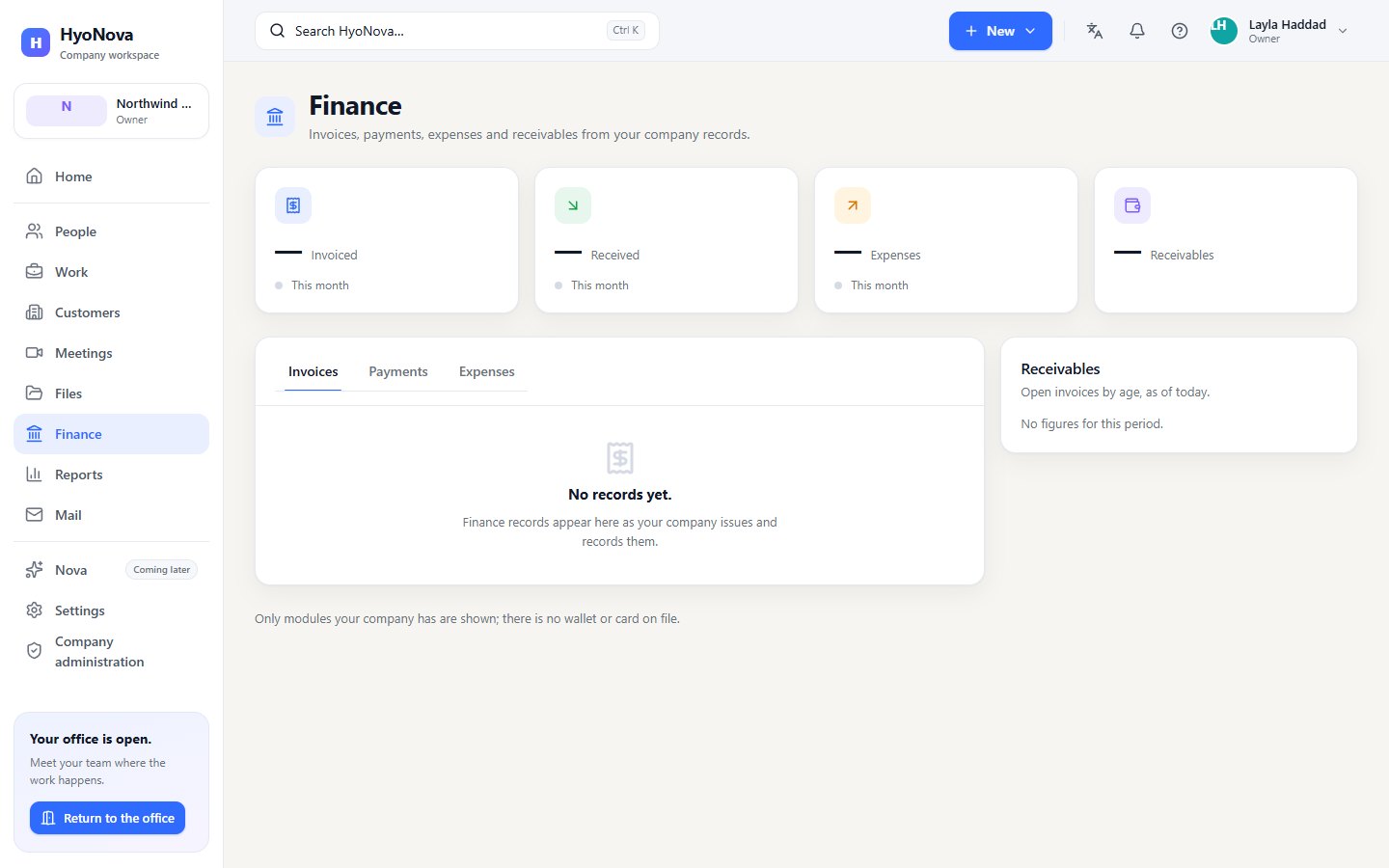
The header reads Invoices, payments, expenses and receivables from your company records.
This month's figures#
Four cards sit at the top: Invoiced, Received and Expenses for This month, and the total of Receivables. Each figure is shown per currency. Reports has the same three figures for a month, a quarter or a year; see Reports.
Invoices, Payments and Expenses#
Tabs switch between the three lists. Each has these columns:
| Column | Meaning |
|---|---|
| Name | The invoice number, or the description or reference of a payment or expense |
| Amount | The total, formatted in the record's currency |
| Status | The record's current status, coloured green for paid or approved and red for overdue, void or rejected |
| Updated | The due date of an invoice, the date of an expense, or when the record last changed |
Each list loads a page at a time; select Load more for more. An empty list says No records yet.
Receivables#
Receivables — "Open invoices by age, as of today." — shows how much customers still owe on issued invoices:
| Bucket | Meaning |
|---|---|
| Not yet due | The due date has not passed |
| 1–30 days | 1 to 30 days past the due date |
| 31–60 days | 31 to 60 days past the due date |
| 61–90 days | 61 to 90 days past the due date |
| Over 90 days | More than 90 days past the due date |
- The amount outstanding is the invoice total minus the payments recorded against it.
- Draft, void and cancelled invoices are not counted, and fully paid invoices drop out.
- Each currency is shown separately; HyoNova does not convert between currencies.
- When nothing is outstanding, the card says No figures for this period.
The page ends with the note Only modules your company has are shown; there is no wallet or card on file.
What HyoNova finance does not do#
HyoNova finance is not an accounting system. It does not:
- email invoices to your customers or take online payments from them — payments are recorded by hand;
- calculate or file tax;
- connect to bank accounts or import bank feeds;
- keep journals or a chart of accounts, or record vendor bills;
- produce financial statements such as a balance sheet or income statement;
- run payroll.
Keep using your accounting software for these. HyoNova makes no compliance claims for its finance features.
How Finance connects to other features#
- Reports. The Invoiced, Received and Expenses metrics in Reports use the same records, so they too show figures only to the owner.
- Sales. Invoices belong to sales as well as finance; see Sales and deals.
- Payroll. Planned separately; see Payroll.
Status and limits#
| Feature | Status | Notes |
|---|---|---|
| Finance overview | PreviewA first, limited version you can use today. Important parts are still missing. | Invoices, payments, expenses and receivables ageing in one place. Read-only lists. The 'This month' cards can stay empty when your device time zone differs from the company's. |
| Accounting tools | PlannedOn the HyoNova roadmap. Not built yet and has no release date. | Journals, chart of accounts, vendor bills and financial statements in the dashboard. |
Was this page helpful?
Thanks. Page ratings are not collected yet, so nothing was sent. If something is missing or wrong, see the Get help page.